

Root or Administrator access
You have full control of the machine. Set the password when you order, then sign in over SSH or through the browser console.
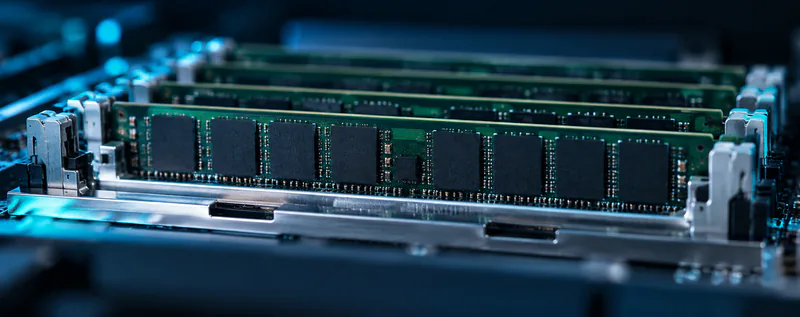
Every VPS is a full virtual machine on XCP-ng, running on Intel Xeon Gold 5220R processors, DDR4 memory and U.2 NVMe SSDs, with full root access and unlimited bandwidth within Thailand.
A VPS is a whole server you run yourself. Install any software its operating system supports.
Run a web server, a database and apps written in any language, and tune every server setting yourself.
Host a game server for your friends, or keep Discord and LINE bots running around the clock without leaving a computer on at home.
Keep a separate machine for trying new systems and testing before release, reinstall it when you want a clean start, and rent by the day for short jobs.
Run accounting, stock or back-office software your team shares, on Linux or Windows Server.
Each VPS is a full virtual machine on XCP-ng, an open-source virtualization platform built on the Xen Project hypervisor. You get a machine with its own kernel and operating system, not a share of an operating system used by other customers.
Xen is a type-1 (bare-metal) hypervisor installed directly on the physical server, not layered on top of another operating system. It divides the server's CPU, memory, disks and network between the virtual machines.
A VPS boots its own kernel like a physical computer. You are root or Administrator, so you can install software that works at kernel level, such as Docker, a VPN server or your own firewall rules, which shared web hosting does not allow.
A full virtual machine can run different operating system families. Choose Linux or Windows Server when you order, and switch later by reinstalling from the portal, which erases the disk.
The browser console shows the virtual machine's screen and keyboard straight from the hypervisor layer, so it works when SSH or RDP does not, for example after a firewall mistake or a broken network setting.
Because your server is a virtual machine, you take snapshots, roll back, power it on and off, reinstall and upgrade from the portal yourself. Nobody has to walk to a physical server.
XCP-ng is open-source software under the GPLv2 licence that packages the Xen hypervisor with everything needed to run virtual machines. It began in 2018 as the community continuation of Citrix XenServer, is led by Vates, and joined the Xen Project, hosted by the Linux Foundation, in 2020.
VPS hosts use Intel Xeon Gold 5220R processors, DDR4 memory and U.2 NVMe SSDs.
A 2nd Gen Xeon Scalable server processor (Cascade Lake) with 24 cores and 48 threads each. A vCPU in your plan is a virtual processor that the hypervisor schedules on these threads, not a physical core reserved for you.
A base clock of 2.20 GHz that Turbo Boost can raise to 4.00 GHz when power and temperature allow, with 35.75 MB of cache, as Intel specifies.
Hosts use DDR4 RAM, and this processor supports six channels of DDR4-2667 memory. The RAM in your plan is the memory your VPS sees and uses.
U.2 is the 2.5-inch server form factor for SSDs that connect over PCIe with the NVMe protocol instead of SATA. The operating system, software and data of every plan live on these drives.
You have full control of the machine. Set the password when you order, then sign in over SSH or through the browser console.
Every plan stores data on NVMe SSD. Each plan’s disk size is in the price list.
Each server gets one IPv4 address and unlimited bandwidth within Thailand. Extra international bandwidth is available as an add-on.
AlmaLinux, Ubuntu, Debian and Windows Server. The versions on offer depend on the region, and the order page shows each system’s minimum spec.
Pick the billing period when you order. Renew automatically from your account balance, or turn that off and renew yourself.
Plans differ in vCPU, RAM and NVMe storage. Unlimited bandwidth within Thailand, one IPv4 address and root access are the same on every plan.
The number of virtual processors your VPS can use. Work that does many things at once, such as a web server with many simultaneous users, a database or compiling code, benefits from more vCPUs. A single-threaded program does not get faster with more of them.
The operating system always uses part of the RAM and the rest is for your software. Databases, caches and Java game servers tend to use a lot. When RAM runs out, the machine slows down or programs stop.
Holds the operating system, software, data and logs. Leave room for growing data and system updates. Windows Server takes more space than Linux, and the order page shows each system's minimum spec.
If no plan fits, choose Custom on the order page to set vCPU, RAM and disk yourself and see the price straight away. A custom plan cannot be moved to a standard plan from the portal; contact support for that.
All plans include NVMe SSD and full root access.
Showing 6 of 16 plans
Plan prices can't be shown right now. Our team will help you pick the right plan.
Ask about plansAdd IPv4 addresses, a dedicated network port or international bandwidth to any of our services. Each add-on costs the same on every service.
Treat these as starting points: what you really need depends on your software and how many people use it. Watch live CPU and memory use in the portal and upgrade when you get close to the limit.
Start with the smallest plan that meets your operating system's minimum spec, and rent by the day if you want to try first.
Weigh RAM first, because databases and caches keep frequently used data in memory, then add vCPUs as simultaneous users grow.
Pick a plan with more RAM and disk than the Windows Server minimum the order page shows, so your own programs have room. For MT4/MT5 there is guidance written for traders.
Check the game's RAM requirement and your player count first; mods and plugins add to memory use. If you want the team to help plan specs or install the game, see the game server service.
Choose a region when you order. Every VPS gets one IPv4 address and unlimited bandwidth within Thailand, and add-ons cover anything beyond that.
Pick the region closer to your users or to the systems your VPS talks to. The operating systems and versions on offer can differ by region; the order page shows the actual list once you choose one.
Every plan comes with unlimited bandwidth within Thailand. If your system sends a lot of traffic from Thailand to other countries, add international bandwidth in 1 Mbps steps at ฿500 a month, and if you need a network port reserved for your machine, Network Dedicated comes in 1 Gbps and 10 Gbps.
Your VPS's public IP appears in the portal's Network tab. If a site or service needs its own IP, add IPv4 addresses at ฿150 each per month.
If a network or firewall change cuts the machine off, reset the network from the portal. It reconfigures the network interface and clears all firewall rules.
All of this is on the VPS detail page in the client portal.
Open the server’s screen and keyboard in a new tab. It works even when a network or firewall mistake has locked you out of SSH.
Start, stop or restart the server yourself, with a force power off for when the system hangs and will not shut down.
Save the disk before an update or a risky change and roll back if something breaks. A free slot is included; each snapshot beyond it is charged once when created.
Move to a larger plan from the portal and pay only the difference for the days left in the billing cycle.
Wipe the disk and install a fresh operating system, the same one or another. Everything on the machine is erased.
Forgot the password? Set a new one from the portal. The machine reboots so the new password takes effect, for both SSH and the console.
See CPU, memory, disk reads and writes, and network traffic while the server runs, refreshed every few seconds.
See the jobs run on the machine in the last 7 days, such as power actions, password resets, reinstalls and upgrades, with the status of anything still running.
Create keys to manage VPS and hosting from your own scripts, limit which IP addresses may use each key, and rotate or revoke keys at any time.
Every VPS is protected against DDoS attacks at no extra cost and with nothing to set up. Attack traffic is filtered out before it reaches your server.
These services differ in who runs the system and what kind of resources you get.
Your site lives on a server we maintain, managed through Plesk with free SSL and email. You cannot install system software or change the kernel. It suits you when a website and email are all you need.
Your own kernel, operating system and root access on XCP-ng, sized by plan and upgradable later. You look after the system, software and updates yourself.
Rent an entire physical server, choose CPU, RAM and disks from the price list and control it through IPMI. It is ordered through sales, and a managed option is available with scope and price agreed with sales. It suits work that needs a whole machine's resources.
The same plans, prices and hardware as this VPS, with guidance on running MT4, MT5 and Expert Advisors on Windows Server.
Add funds with PromptPay, TrueMoney, card or crypto. The balance pays for new services and renewals.
Pick Thailand or Singapore, the operating system and version, then a plan and billing period. Or choose Custom to set vCPU, RAM and disk yourself and see the price straight away.
Enter a server name and root password, then confirm. The amount is deducted from your balance immediately.
The new server shows in your services with its setup progress. Once it is online, sign in with your password or through the console.
Every VPS is a full virtual machine on XCP-ng, an open-source virtualization platform that uses Xen, a bare-metal hypervisor. Hosts use Intel Xeon Gold 5220R processors, DDR4 memory and U.2 NVMe SSDs.
No. A vCPU is a virtual processor that the hypervisor schedules on the threads of the Xeon Gold 5220R processors, not a physical core reserved for you.
AlmaLinux, Ubuntu, Debian and Windows Server; the versions depend on the region. You can switch later by reinstalling from the portal, which erases the disk.
Yes. A VPS has its own kernel and you have root or Administrator access, so you can install Docker and a VPN server and set your own firewall rules. If a firewall mistake locks you out, use the browser console or reset the network from the portal.
Yes. Move to a larger plan from the portal to add CPU, RAM and disk space on the same VPS without migrating data. You pay only the difference for the days left in the billing period.
Yes, Thailand or Singapore, chosen when you order. The operating systems on offer may differ by region.
Yes. Every VPS includes one IPv4 address, and extra IPv4 addresses cost ฿150 each per month. Ask the team through the contact page or a support ticket.
Top up your account with PromptPay, TrueMoney, card or crypto, then choose daily, weekly, monthly or yearly billing. With auto-renewal on, the renewal is charged from your balance on the renewal date; if the balance is too low, the renewal fails and the service may expire.
You can create and roll back snapshots yourself in the portal. Deleting a VPS also deletes its snapshots, so keep copies of important data somewhere else too.
Open the browser console from the VPS details page; it works even when SSH or RDP does not. If the machine's network is broken, reset the network. If you forgot the password, reset it from the portal. If you still cannot get in, open a support ticket.
A VPS is self-managed: you look after the operating system, software and updates. Our support team gives guidance through support tickets. If you want a website without running a server, choose web hosting instead.
Fees are non-refundable by default, except in the cases our refund policy lists, such as a service we never provisioned or a billing error on our side. The refund policy has the full terms.
Join 5,000+ customers who trust DriteStudio to manage their infrastructure
Choose whether to allow analytics cookies. Turning them off does not affect how the site works.
Needed for the site to work and to remember choices you make, such as your sign-in, language, theme and this cookie choice, so they cannot be turned off.
lang (chosen language) · Sign-in, theme and cookie choice (stored in your browser)
These cookies help us understand how visitors interact with our website by collecting and reporting information anonymously.
_ga (Google Analytics) · _ga_* (Google Analytics)
Add it to your home screen to open it in one tap, like an app.