Raspberry Pi คืออะไร? คู่มือเริ่มต้นใช้งานฉบับสมบูรณ์ 2026
คู่มือ Raspberry Pi ฉบับสมบูรณ์ ตั้งแต่เตรียมอุปกรณ์ ติดตั้ง OS ตั้งค่าเบื้องต้น ไปจนถึงไอเดียโปรเจกต์ที่น่าสนใจ เหมาะสำหรับผู้เริ่มต้น
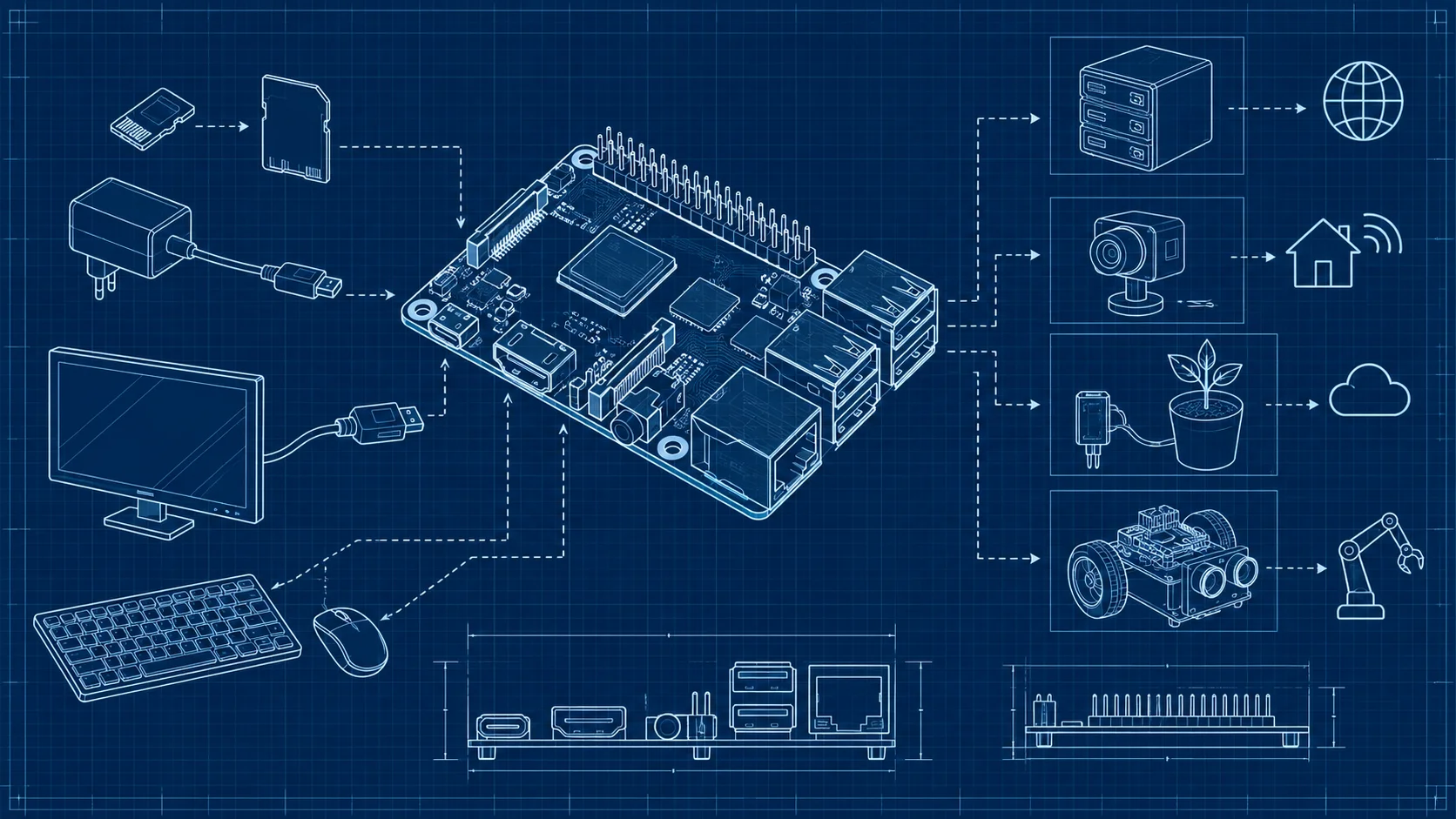
การใช้ Raspberry Pi เบื้องต้น คู่มือสำหรับผู้เริ่มต้น
Raspberry Pi คือคอมพิวเตอร์ขนาดเล็กราคาประหยัดที่สามารถใช้เป็นเครื่องคอมพิวเตอร์เต็มรูปแบบ เซิร์ฟเวอร์ขนาดเล็ก หรืออุปกรณ์ IoT ได้ เริ่มต้นใช้งานได้ง่ายเพียงมี Raspberry Pi, การ์ด microSD, สายไฟ และจอภาพ เหมาะสำหรับทั้งผู้เริ่มต้นเรียนรู้คอมพิวเตอร์และนักพัฒนาที่ต้องการสร้างโปรเจกต์ DIY
Raspberry Pi คืออะไร
Raspberry Pi เป็นคอมพิวเตอร์บอร์ดเดียว (Single Board Computer) ที่พัฒนาโดย Raspberry Pi Foundation ในสหราชอาณาจักร มีขนาดเท่าบัตรเครดิตแต่สามารถทำงานได้เหมือนคอมพิวเตอร์ทั่วไป ราคาเริ่มต้นเพียงไม่กี่ร้อยบาท
รุ่นที่นิยมในปัจจุบันคือ Raspberry Pi 5 ซึ่งมาพร้อมชิป Broadcom BCM2712 แรม 4 หรือ 8 GB พอร์ต USB 3.0 และรองรับ M.2 SSD
อุปกรณ์ที่ต้องเตรียม
สำหรับเริ่มต้นใช้งาน Raspberry Pi ต้องมีอุปกรณ์ดังนี้
- Raspberry Pi เลือกรุ่นที่เหมาะกับการใช้งาน เช่น Pi 5, Pi 4 หรือ Pi Zero 2 W
- การ์ด microSD แนะนำขนาด 32 GB ขึ้นไป ควรเลือก Class 10 หรือ A2
- สายไฟ USB-C สำหรับ Pi 4 และ Pi 5 ใช้ USB-C
- จอภาพ ที่มีพอร์ต HDMI พร้อมสาย Micro HDMI
- คีย์บอร์ดและเมาส์ USB หรือ Bluetooth
- เคส ไม่จำเป็นแต่แนะนำเพื่อป้องกันบอร์ด
วิธีติดตั้งระบบปฏิบัติการ
ใช้ Raspberry Pi Imager
วิธีที่ง่ายที่สุดคือใช้ Raspberry Pi Imager ซึ่งเป็นโปรแกรมจาก Raspberry Pi Foundation
- ดาวน์โหลด Raspberry Pi Imager จากเว็บไซต์ทางการ
- เสียบการ์ด microSD เข้ากับคอมพิวเตอร์
- เปิดโปรแกรมและเลือกรุ่น Raspberry Pi
- เลือกระบบปฏิบัติการ (แนะนำ Raspberry Pi OS)
- เลือก Storage เป็นการ์ด microSD
- ตั้งค่า Wi-Fi, Username และ Password ผ่าน Settings
- กดปุ่ม Write แล้วรอจนเสร็จ
ระบบปฏิบัติการที่รองรับ
- Raspberry Pi OS (แนะนำ) ระบบปฏิบัติการหลักที่พัฒนาจาก Debian
- Ubuntu Server เหมาะสำหรับใช้เป็นเซิร์ฟเวอร์
- LibreELEC สำหรับใช้เป็น Media Center
- RetroPie สำหรับเล่นเกมย้อนยุค
- Home Assistant สำหรับระบบ Smart Home
การเริ่มต้นใช้งานครั้งแรก
หลังจากติดตั้งระบบปฏิบัติการแล้ว
- เสียบการ์ด microSD เข้ากับ Raspberry Pi
- ต่อจอภาพ คีย์บอร์ด และเมาส์
- เสียบสายไฟเพื่อเปิดเครื่อง
- ระบบจะบูตเข้าหน้า Desktop หรือ Terminal
- ทำการตั้งค่าเบื้องต้นตามคำแนะนำ
- อัปเดตระบบด้วยคำสั่ง sudo apt update && sudo apt upgrade
โปรเจกต์ที่ทำได้ด้วย Raspberry Pi
เซิร์ฟเวอร์ส่วนตัว
Raspberry Pi สามารถใช้เป็นเซิร์ฟเวอร์ขนาดเล็กได้หลายรูปแบบ
- Web Server ด้วย Apache หรือ Nginx
- File Server ด้วย Samba หรือ Nextcloud
- VPN Server ด้วย WireGuard หรือ OpenVPN
- DNS Server ด้วย Pi-hole สำหรับบล็อกโฆษณา
สำหรับงานที่ต้องการประสิทธิภาพและความเสถียรสูงกว่า Raspberry Pi การใช้เซิร์ฟเวอร์ VPS จะเป็นตัวเลือกที่เหมาะสมกว่า
ระบบ IoT
- สถานีตรวจวัดสภาพอากาศ
- ระบบรดน้ำต้นไม้อัตโนมัติ
- กล้องวงจรปิด
- ระบบ Smart Home
สื่อการเรียนรู้
- เรียนรู้ Linux Command Line
- เรียนรู้การเขียนโปรแกรม Python
- เรียนรู้เรื่อง Networking
- เรียนรู้ Electronics พื้นฐาน
การเชื่อมต่อ Raspberry Pi แบบ Headless
หากไม่มีจอภาพสำรอง สามารถเชื่อมต่อแบบ Headless ได้
- ตั้งค่า SSH ให้เปิดใช้งานผ่าน Raspberry Pi Imager
- ตั้งค่า Wi-Fi ผ่าน Imager เช่นกัน
- เสียบการ์ด microSD แล้วเปิดเครื่อง
- หา IP Address ของ Raspberry Pi จาก Router
- เชื่อมต่อผ่าน SSH ด้วย PuTTY หรือ Terminal
เปรียบเทียบ Raspberry Pi กับ VPS
Raspberry Pi เหมาะสำหรับการเรียนรู้และโปรเจกต์ส่วนตัว แต่หากต้องการเซิร์ฟเวอร์สำหรับงานจริง VPS หรือDedicated Server จะเหมาะสมกว่า เพราะมีความเสถียร ประสิทธิภาพ และ Uptime ที่สูงกว่ามาก
คำถามที่พบบ่อย
Raspberry Pi ใช้แทนคอมพิวเตอร์ได้ไหม
ได้ในระดับหนึ่ง Raspberry Pi สามารถท่องเว็บ ดูวิดีโอ ทำเอกสาร และเขียนโปรแกรมได้ แต่ประสิทธิภาพจะน้อยกว่าคอมพิวเตอร์ทั่วไป ไม่เหมาะกับงานหนักอย่างตัดต่อวิดีโอหรือเล่นเกม 3D
Raspberry Pi รุ่นไหนดีสำหรับผู้เริ่มต้น
แนะนำ Raspberry Pi 4 Model B (4 GB) หรือ Raspberry Pi 5 (4 GB) เพราะมีประสิทธิภาพเพียงพอสำหรับการเรียนรู้ มีพอร์ตเชื่อมต่อครบ และมี Community ที่ใหญ่พร้อมคู่มือมากมาย
Raspberry Pi กินไฟเท่าไหร่
Raspberry Pi กินไฟน้อยมาก Pi 4 ใช้ไฟประมาณ 3-7 วัตต์ และ Pi 5 ใช้ประมาณ 5-12 วัตต์ หากเปิดทิ้งไว้ 24 ชั่วโมง ค่าไฟจะไม่ถึงเดือนละ 10 บาท
Raspberry Pi เรียนรู้ Programming ได้ไหม
ได้อย่างดี Raspberry Pi OS มาพร้อม Python, Scratch และ IDE สำหรับเขียนโปรแกรมหลายตัว เหมาะสำหรับผู้เริ่มต้นที่ต้องการเรียนรู้การเขียนโค้ดและ Linux
เริ่มต้นเรียนรู้คอมพิวเตอร์และ Server ด้วย Raspberry Pi และเมื่อพร้อมขยายสู่ระบบจริง DriteStudio มีบริการ VPS และHosting ที่พร้อมรองรับทุกโปรเจกต์ ติดต่อเราเพื่อเริ่มต้น