ปัญหา Boot Linux แก้ยังไง? GRUB, Initramfs, Filesystem ครบจบ
แก้ปัญหา Linux บูตไม่ขึ้น สาเหตุจาก GRUB initramfs filesystem พร้อมวิธีแก้ไขทีละขั้นตอน
Linux บูตไม่ขึ้น ทำยังไงดี
เปิดเซิร์ฟเวอร์แล้วเจอหน้าจอดำ ข้อความ error แปลก ๆ หรือค้างอยู่ตรง GRUB ไม่ยอมเข้าระบบ ปัญหาตอนบูต Linux เป็นเรื่องที่เจอได้เสมอ แต่ถ้ารู้สาเหตุและวิธีแก้ ก็ไม่ต้องตกใจ
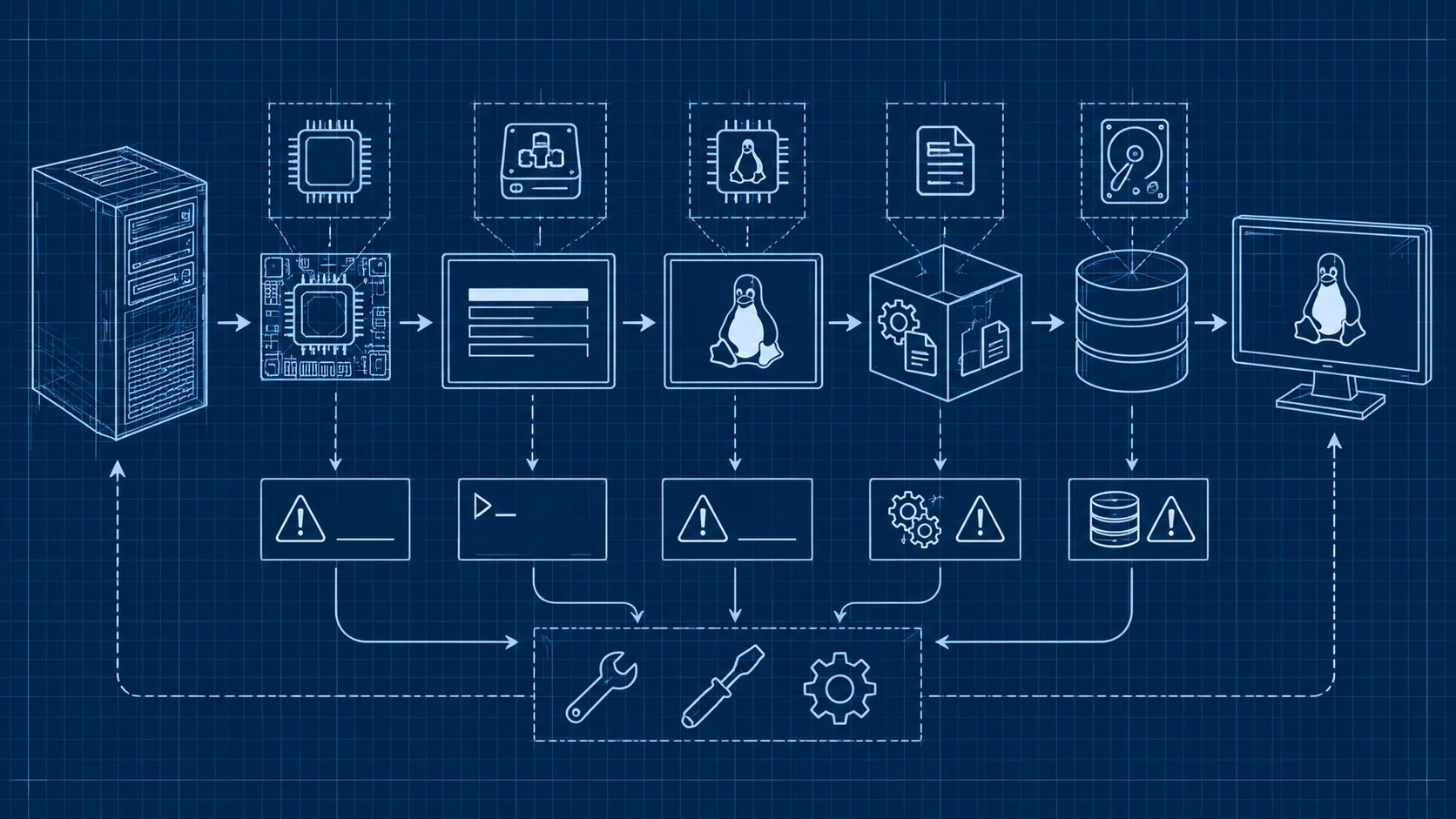
ขั้นตอนการบูต Linux มีหลายส่วนทำงานต่อกัน เริ่มจาก BIOS/UEFI ไป bootloader โหลด kernel จากนั้น initramfs เตรียมระบบพื้นฐาน สุดท้าย mount filesystem แล้วเริ่ม init system ถ้าขั้นตอนไหนมีปัญหาก็บูตไม่ผ่าน
ปัญหา GRUB Bootloader
GRUB เป็น bootloader ที่ใช้กันมากที่สุดบน Linux ปัญหาที่เจอบ่อยมีหลายแบบ
GRUB Rescue Mode
เห็นข้อความ grub rescue> แสดงว่า GRUB หาไฟล์ config ไม่เจอ อาจเป็นเพราะ partition table เปลี่ยนหรือไฟล์ GRUB เสียหาย วิธีแก้คือบูตจาก live USB แล้วติดตั้ง GRUB ใหม่:
# mount root partition
sudo mount /dev/sda2 /mnt

# mount boot partition (ถ้าแยก)
sudo mount /dev/sda1 /mnt/boot

# mount ระบบที่จำเป็น
sudo mount --bind /dev /mnt/dev
sudo mount --bind /proc /mnt/proc
sudo mount --bind /sys /mnt/sys

# chroot เข้าไปในระบบ
sudo chroot /mnt

# ติดตั้ง GRUB ใหม่
grub-install /dev/sda

# อัปเดต GRUB config
update-grub
GRUB ไม่แสดงเมนู
อัปเดตระบบแล้ว GRUB ไม่ได้อัปเดตตาม ชี้ไปที่ kernel ที่ไม่มีอยู่ แก้ด้วย:
# Debian/Ubuntu
sudo update-grub

# RHEL/CentOS
sudo grub2-mkconfig -o /boot/grub2/grub.cfg
ตรวจสอบว่า GRUB config ถูกต้อง:
cat /boot/grub/grub.cfg | grep menuentryError Unknown Filesystem
GRUB ไม่รู้จัก filesystem ของ partition มักเกิดหลัง resize partition หรือ filesystem เสียหาย แก้ด้วยการบูต live USB แล้วตรวจสอบ partition:
sudo fdisk -l
sudo blkid
ปัญหา Initramfs
Initramfs คือ filesystem ชั่วคราวที่โหลดเข้า RAM ตอนบูต เตรียม driver และเครื่องมือก่อน mount root filesystem จริง
ค้างอยู่ที่ initramfs prompt
เห็น (initramfs) prompt แสดงว่า mount root partition ไม่ได้ สาเหตุหลักคือ root partition เสียหาย ลอง fsck จาก prompt:
# ที่ initramfs prompt ให้รัน
fsck /dev/sda2 -y

# ถ้าไม่แน่ใจว่า root อยู่ partition ไหน
blkid
ถ้าเป็นเพราะ UUID ไม่ตรง (เปลี่ยน disk แล้ว UUID เปลี่ยน) ต้องแก้ /etc/fstab:
# mount root partition แบบ manual
mount /dev/sda2 /root

# แก้ไข fstab ให้ UUID ตรง
nano /root/etc/fstab
Initramfs เสียหาย
เสียหายจากการอัปเดตที่ไม่สมบูรณ์ บูตจาก live USB แล้ว chroot เข้าไปสร้างใหม่:
# Debian/Ubuntu
sudo chroot /mnt
update-initramfs -u -k all

# RHEL/CentOS
sudo chroot /mnt
dracut --force
ปัญหา Filesystem
fsck ตอนบูต
Linux ตรวจสอบ filesystem อัตโนมัติเป็นระยะ ถ้า fsck พบปัญหาที่แก้อัตโนมัติไม่ได้ ระบบหยุดบูตแล้วขอให้เราจัดการ:
# ซ่อม filesystem อัตโนมัติ (ระวังอาจสูญเสียข้อมูลบางส่วน)
fsck -y /dev/sda2

# ซ่อมแบบ interactive ปลอดภัยกว่า
fsck /dev/sda2
Read-only Filesystem
บูตได้แต่ filesystem เป็น read-only แสดงว่า kernel ตรวจพบปัญหาแล้วสลับเป็น read-only เพื่อป้องกันความเสียหาย:
# unmount แล้วรัน fsck
sudo umount /dev/sda2
sudo fsck -y /dev/sda2

# mount กลับ
sudo mount /dev/sda2 /mnt
วิธีแก้ไขด้วย Recovery Mode
Recovery Mode จาก GRUB
ตอนอยู่ที่เมนู GRUB เลือก Advanced options แล้วเลือก recovery mode kernel บูตเข้าโหมดซ่อมแซมที่มีเครื่องมือพื้นฐานให้ใช้
บูตจาก Live USB
ถ้า GRUB ใช้ไม่ได้เลย ใช้ live USB บูตเข้า live environment แล้ว chroot เข้าไปซ่อมแซม:
# mount partition ทั้งหมด
sudo mount /dev/sda2 /mnt
sudo mount /dev/sda1 /mnt/boot
sudo mount --bind /dev /mnt/dev
sudo mount --bind /proc /mnt/proc
sudo mount --bind /sys /mnt/sys

# chroot เข้าไป
sudo chroot /mnt

# ซ่อมแซม GRUB
grub-install /dev/sda
update-grub

# สร้าง initramfs ใหม่
update-initramfs -u

# ออกจาก chroot
exit
sudo umount -R /mnt
sudo reboot
ป้องกันปัญหาตอนบูต
อัปเดตระบบอย่างระมัดระวัง ตรวจสอบก่อนรีบูต เก็บ kernel เก่าไว้อย่างน้อย 2 version เป็น fallback ตรวจสอบ disk health ด้วย smartmontools เป็นประจำ:
sudo smartctl -H /dev/sdaสำรอง config สำคัญอย่าง /etc/fstab และ GRUB config ไว้ในที่ปลอดภัย:
sudo cp /etc/fstab /etc/fstab.bak
sudo cp /boot/grub/grub.cfg /boot/grub/grub.cfg.bak
ใช้ VPS ไม่ต้องกังวลเรื่องบูต
ปัญหาตอนบูตส่วนใหญ่มาจากฮาร์ดแวร์ไม่เสถียรหรือ disk มีปัญหา ถ้าไม่อยากปวดหัวกับเรื่องเหล่านี้ VPS ของ DriteStudio ดูแลเรื่อง hardware ให้ทั้งหมด คุณแค่โฟกัสที่การใช้งานเซิร์ฟเวอร์
สำหรับใครที่ต้องการความมั่นใจมากขึ้น Dedicated Server ของ DriteStudio มาพร้อม hardware ระดับ enterprise ทดสอบอย่างเข้มงวดก่อนส่งมอบ Hosting ของ DriteStudio ก็เป็นอีกตัวเลือกสำหรับคนที่ไม่อยากจัดการ server เองเลย ให้ทีม DriteStudio ดูแลทุกอย่าง
คำถามที่พบบ่อย (FAQ)
Linux บูตไม่ขึ้น สาเหตุที่พบบ่อยที่สุดคืออะไร?
GRUB config เสียหายหรือชี้ไปที่ kernel ที่ไม่มีอยู่ แก้ด้วยการ boot จาก live USB แล้วติดตั้ง GRUB ใหม่
เห็น initramfs prompt หมายความว่าอะไร?
หมายความว่า initramfs ไม่สามารถ mount root partition ได้ สาเหตุมักเป็น filesystem เสียหายหรือ UUID ไม่ตรง
ควรเก็บ kernel เก่าไว้กี่ version?
อย่างน้อย 2 version เพื่อเป็น fallback ถ้า kernel ใหม่มีปัญหา
ใช้ VPS แล้วยังเจอปัญหาบูตไหม?
น้อยมากครับ เพราะ VPS ไม่มีปัญหาเรื่อง hardware แต่ยังเจอได้จากปัญหา software เช่น config ผิดหรือ filesystem เสียหาย
ปัญหาตอนบูต Linux แก้ได้ถ้ามีความรู้พื้นฐาน ทำความเข้าใจขั้นตอนการบูต รู้จักเครื่องมือซ่อมแซม และสำรองข้อมูลเป็นประจำ เตรียมโครงสร้างพื้นฐานที่ดีกับ DriteStudio
DriteStudio
Digital infrastructure provider for VPS, web hosting, and colocation in Thailand
Operated by Craft Intertech (Thailand) Co., Ltd.